
If you’ve started looking into automating your business workflows, you’ve probably come across n8n. It shows up frequently alongside tools like Zapier and Make, but most explanations of what it actually does assume you already know how automation platforms work.
This guide explains what n8n workflow automation is, how it differs from other tools, and whether it’s the right fit for a small to mid-sized business that wants to automate repetitive processes without writing code.
What Is n8n?
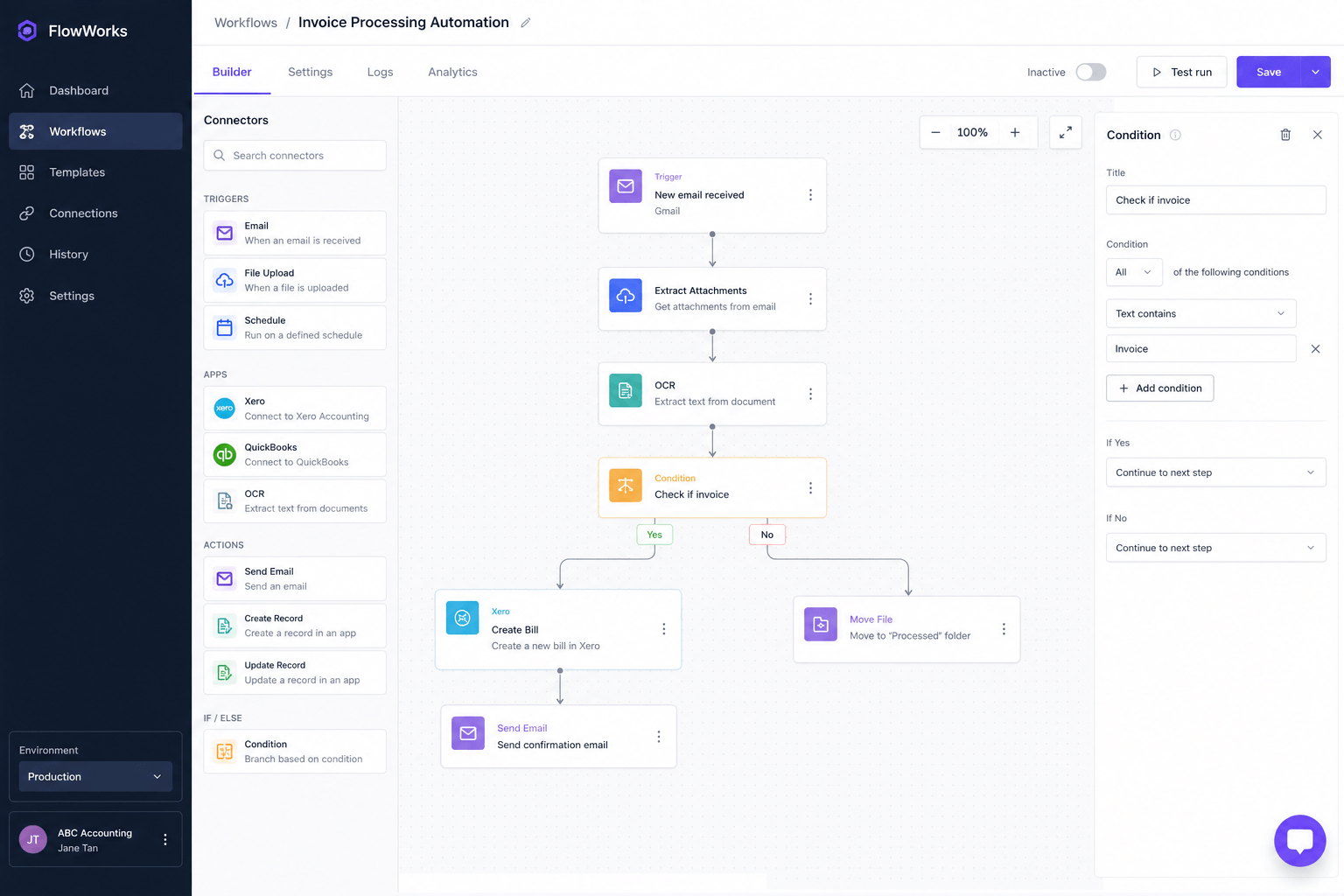
n8n is a workflow automation platform that lets you connect apps, tools, and services together and define sequences of actions that run automatically. You build a workflow visually by connecting nodes, where each node represents either a trigger, an action, or a piece of logic.
When a defined event happens in one tool, n8n can automatically carry out a series of tasks across multiple other tools in response. No manual input required between each step.
The name n8n stands for “nodemation”, a reference to the node-based, visual way workflows are built. It is open source, which means the underlying code is publicly available, and it can be run on your own server or through n8n’s cloud hosting option.
How Does n8n Workflow Automation Work?
Every n8n workflow starts with a trigger. A trigger is the event that starts the workflow running. Common triggers include a new row appearing in a spreadsheet, a form being submitted on a website, an invoice becoming overdue in Xero, a webhook receiving data from another app, or a scheduled time arriving.
Once the trigger fires, the workflow moves through a series of nodes in sequence. Each node does something: it sends an email, creates a record in another app, checks a condition, transforms data, posts a Slack message, or waits for a specified period before continuing.
A simple example: a new client fills out a contact form on your website. That form submission triggers an n8n workflow. The workflow creates a contact record in your CRM, sends the client an acknowledgement email, notifies your team in Slack, and adds the client to a follow-up sequence. All of this happens in seconds, automatically, without anyone manually doing each step.
What Makes n8n Different from Zapier or Make?
n8n, Zapier, and Make all do broadly the same thing: connect apps and automate workflows. The differences matter depending on your situation.
Self-Hosting
The most significant difference is that n8n can be self-hosted. You can install n8n on your own server, a cloud server in a region of your choice, or a local machine. This means your data stays on your own infrastructure rather than passing through a third-party platform.
For businesses handling sensitive client data, such as accounting firms managing financial records, this is a meaningful advantage. Zapier and Make are cloud-only, meaning your data flows through their servers.
Pricing Model
Zapier charges per task, meaning each action a workflow takes counts toward your monthly usage. At scale, this adds up quickly. n8n’s cloud pricing is based on workflow executions rather than individual tasks, which makes it considerably more cost-effective for complex workflows with many steps.
The self-hosted version of n8n has no per-task or per-execution cost. You pay for the server it runs on, not for how much you use it.
Technical Flexibility
n8n gives you more control over workflow logic than Zapier does. You can write JavaScript directly inside a workflow to transform data, apply complex conditions, or handle edge cases that don’t fit a simple if-this-then-that structure. Zapier is simpler to start with but hits limitations faster when workflows become more complex.
Make sits between the two: more flexible than Zapier, less technical depth than n8n.
Number of Integrations
Zapier has a larger library of pre-built app integrations, covering thousands of tools. n8n covers several hundred out of the box but also supports custom integrations via HTTP requests and webhooks, meaning it can connect to almost any tool that has an API. For most business use cases, n8n’s integration library is more than sufficient.
What Can You Build with n8n?
The range of workflows you can build with n8n is broad. A few practical examples across different business types:
For accounting firms: automated invoice chasing sequences connected to Xero or QuickBooks Online, client onboarding workflows triggered by engagement letter signing, monthly reporting notifications, document collection chase-ups, and GST filing deadline reminders.
For service businesses: lead enquiry responses triggered by website form submissions, automatic CRM record creation, follow-up email sequences, project kickoff notifications when a new client is confirmed, and internal team alerts when a deadline is approaching.
For e-commerce and operations: order notification workflows, inventory alert systems, customer support ticket routing, and data syncing between multiple platforms.
The common thread is that n8n is best suited for workflows that involve moving data between tools, sending communications based on defined triggers, and handling the repetitive handoffs that currently require someone to remember to do them manually.
Is n8n Suitable for Non-Technical Users?
n8n is designed to be used visually, without writing code. You drag and drop nodes onto a canvas, connect them together, and configure each node by filling in fields rather than writing scripts.
For straightforward workflows, a non-technical user can build and run them with some patience and familiarity with the platform. n8n’s documentation is thorough, and there is an active community forum where common questions are answered.
That said, n8n has a steeper learning curve than Zapier. Zapier is designed to be accessible to anyone within minutes. n8n assumes a bit more comfort with understanding how apps and APIs work, even if you don’t need to write code.
For businesses that want n8n’s flexibility and data control without investing the time to learn the platform, working with someone who specialises in building n8n workflows is a practical alternative.
n8n for Accounting Firms: Why It’s the Right Fit
Accounting firms have specific requirements that make n8n a stronger choice than Zapier or Make for most use cases.
Data residency. Client financial data is sensitive. n8n’s self-hosted option means that data can stay on a server in Singapore or whichever region the firm operates in, rather than passing through Zapier’s or Make’s servers. For firms with data protection obligations under Singapore’s PDPA or similar legislation, this matters.
Xero and QuickBooks Online integration. n8n connects natively to both platforms via their APIs. Invoice data, client records, payment statuses, and transaction information can all be read and acted on automatically within an n8n workflow.
Complex workflow logic. Accounting workflows often involve conditions: send a different email if the client is a GST-registered business, escalate to the account manager if the invoice is more than 14 days overdue, skip the reminder if the client has an active dispute. n8n handles this conditional logic cleanly, where simpler platforms require workarounds.
Cost at scale. A firm running invoice chasing, onboarding, reporting notifications, and deadline reminders simultaneously across 30 clients would generate hundreds of individual task executions per month in Zapier. On n8n’s self-hosted version, that same workload has no incremental cost.
FAQ
What is n8n used for?
n8n is used to connect apps and automate workflows between them. Common use cases include automating email sequences based on events in other tools, syncing data between platforms, sending notifications when defined conditions are met, building client communication workflows, and handling repetitive multi-step processes without manual intervention between each step.
Is n8n free to use?
n8n is open source and free to self-host. If you run n8n on your own server, there is no licensing cost. n8n also offers a cloud-hosted version with a free tier for small usage and paid plans based on workflow executions per month. The self-hosted option is the most cost-effective for businesses with consistent, high-volume automation needs.
How is n8n different from Zapier?
The main differences are data control, pricing, and technical flexibility. n8n can be self-hosted, keeping your data on your own infrastructure. Zapier is cloud-only. n8n’s pricing is based on workflow executions rather than individual task steps, making it cheaper for complex workflows. n8n also supports more advanced logic and custom code within workflows, while Zapier is simpler to use but more limited in what it can handle.
Do you need to know how to code to use n8n?
No. n8n is built around a visual workflow editor where you connect nodes and configure settings without writing code. However, it does have a steeper learning curve than tools like Zapier, and familiarity with how APIs and app integrations work makes the experience easier. For complex workflows or businesses without technical resources internally, working with an n8n specialist is a practical option.
Can n8n connect to Xero or QuickBooks Online?
Yes. n8n connects to both Xero and QuickBooks Online via their APIs. This allows workflows to read invoice data, check payment statuses, create or update client records, and trigger actions based on changes in either platform. Accounting firms commonly use this to build automated invoice chasing, onboarding, and reporting workflows directly connected to their accounting software.
Getting Started with n8n
n8n is one of the most capable workflow automation tools available for small to mid-sized businesses that want control over their data and flexibility in what they can build.
For accounting firms specifically, it covers the full range of automation workflows that matter most: invoice chasing, client onboarding, document collection, reporting notifications, and deadline reminders, all connected directly to Xero or QuickBooks Online.
If you want to implement n8n for your accounting firm without building the workflows yourself, that’s what we do at Lenworks. We design, build, and deploy n8n automation workflows for accounting and bookkeeping firms in Singapore and beyond.
Related reading: Accounting Automation Examples | How to Automate Your Accounting Firm